
In today’s world, busy schedules and geographical distances don’t have to stop your tabletop RPG group from embarking on epic adventures. Many hobbyists, like myself, enjoy a bit of a hybrid approach, mixing in virtual sessions alongside classic in-person gatherings. This flexibility opens doors for more consistent gameplay and keeps the campaign rolling even when schedules clash.
But venturing into the virtual realm can be daunting for some. Fear not, dungeon delvers or spacefarers! Having successfully navigated the online RPG landscape, I’m here to share some valuable tips and tricks to help you launch your own virtual missions and adventures. Get ready to roll those digital dice and prepare for a crash course in creating an immersive online RPG experience! Nobody likes those sessions where everybody excuses themselves last minute so listen up and listen well!
The Right Tools For The Job:
There are plenty of tools online for hosting virtual sessions and it can all be a bit daunting to the newer DMs and Wardens but let me start this off by telling you that plenty of these systems have similar if not the same mechanics like: maps, character tokens, character sheets, dice rolling, and fog of war to name a few.
My personal toolkit consists of Discord, owlbear.rodeo, Character sheets for Mothership or dndbeyond for Dungeons & Dragons, and even though I usually don’t use it, I will stream background music from YouTube. Of course this is just the setup that my players and I are used to and prefer but there are plenty of options for what you’re looking for! Here’s a few for you to check out if you are wanting to explore:
- Virtual Tabletop Software (VTT): Popular options include Roll20, Foundry VTT, Fantasy Grounds, and Astral.
- Communication Tools: Utilize platforms like Discord, Zoom, or Google Meet for voice chat.
- Mood Music & Sound Effects: Syrinscape, Tabletop Audio, or royalty-free online options.
(Although music and sound effects can help with immersion, just remember to not overdo it. As the gamemaster the responsibility ultimately lies with you to create the raw emotions throughout a campaign using descriptive language and scenery.)
Streamlining Sessions: How Discord Keeps My Virtual RPG Group Organized
Within my group, discord is used as a centralized location for anything my players might be looking for, the server contains chats for specific campaigns and one-shot, resources for character creation or becoming a DM and any useful tools that might be needed. I also use Discord to organize the sessions, here’s the process I go through for accomplishing that:
Discord Events
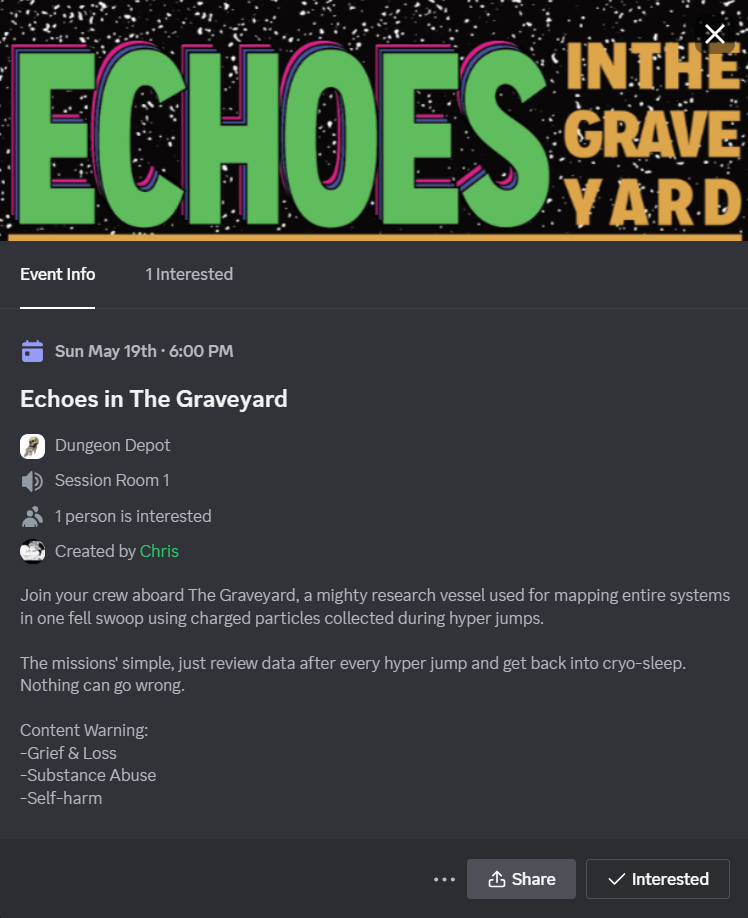
The first thing I do on discord is create an event, this works as a central area for any of the sessions details and makes my life as a DM easier (I just don’t like repeating myself so it’s easier to send people to the events section.)
I then go to my announcements channel and @ specific roles that I think might be interested in the one-shot for this example I would probably mention the players with the Mothership tag as this is a Mothership RPG one-shot. I give my players about 4-5 days to say if their interested and if they are then the session has the go-ahead to happen!
Make sure to check with your players what date and time works best for them, my group prefers late evening sessions on a Sundays
Owlbear.rodeo
Owlbear.rodeo keeps things simple yet powerful. Don’t be fooled by its “bare bones” interface. Owlbear Rodeo shines in its customizability. Through constantly updated extensions, you can tailor the platform to create the perfect virtual tabletop experience for your group. From essential features like fog of war, dice rolling, and initiative trackers to integrated character sheets, Owlbear Rodeo offers a variety of tools to suit your needs.
I don’t really enjoy using overcomplicated systems so I prefer to use these extensions:
Maintaining Focus Digitally:
In today’s tech-driven world, maintaining focus during tabletop sessions, whether in person or online, can be a challenge. But fear not, fellow Game Masters! Here are two key strategies to keep your virtual players engaged and immersed in the adventure:
1. Reward and Recognition:
- Actively Engaged Players Deserve Rewards: Consider awarding in-game bonuses for players who actively describe their actions, come up with creative solutions to problems, or contribute positively to the atmosphere. This incentivizes participation and keeps everyone invested in the story.
2. Combating Digital Fatigue:
- Virtual Whiteboard for Collaborative Note-Taking: Utilize virtual whiteboards for players to take notes, sketch battle plans, or track resources. This collaborative tool keeps everyone focused on the game and provides a shared space for strategizing.
- Short Breaks are Key: Incorporate short breaks during longer sessions to allow players to stretch, grab a snack, or chat casually. These breaks help prevent digital fatigue and ensure everyone returns refreshed and ready to continue the adventure.
Want to share your own experiences and create an engaging online RPG community? Let’s hear from you! In the comments below, discuss:
- Your biggest challenges for keeping players focused online.
- Creative reward systems you’ve used to incentivize participation.
- Favorite tools or platforms that have boosted engagement in your virtual games.
- Your approach to breaks during sessions – do you have a set schedule or improvise?
Share your thoughts and experiences – I’m eager to learn from fellow Game Masters and create a vibrant community around the art of virtual tabletop RPGs! You can also find me on social media to continue the conversation.


